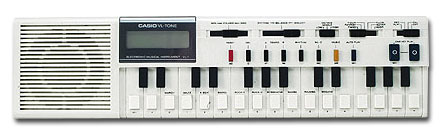
The most exciting electronic monophone synthesizer was my first analogue synthesizer, with a 25-keys touch keyboard and a good versatile sound.
Go to NEXT CHAPTER (P-ART and his RECORDING TOOLS)
Which electronic instruments and tools do I use? Click on the desired item or scroll down
P-ART ELECTRONIC INSTRUMENTAL GALLERY P-ART MUSIC SOFTWARE TOOLS The WASP (Electronic Dream Plant, UK) was my first all-in-one synthesizer. My analogue synthesizers were the SH101 & MC202. My real first digital wave synthesizer is always the ESQ1 (Ensoniq) that I still practise for creating fat patches and microtuning scales. The next synthesizer / sample player and workstation was the EQUINOX 76 (GEM). The sound quality of the synthesizer part and creating new rhythm patterns are excellent and versatile features of the Equinox. The sampler in the EQUINOX was at releasetime the all-in-one opportunity, but the timecosting download of samples and editing the samplingmap were not enjoying. Editing (truncate, chop etc.) isn't possible because the Equinox has only a sampleplayer. For that reason I switched to the FANTOM Xa, specialized in realtime sampling with much more expanded memory (internal and SD-card).
I still love the sound quality of my first sampler MIRAGE (Ensoniq). My Mirage delivered my first frustration in making and editing good working samples and my first happiness in microtuning. To make samples, I still use PEAK on my Mac. To check them out, I hear the results, I access the versatile Quicktime software for Mac (also available for PC now). To have an ordinary soundcheck of MIDI-compositions, at that time I connected my computer unit to the small MIDI-keyboard Casio GZ-500 with his integrated sound system. Fascinated by styles and arrangements MIDI-Yamaha QY-70 is a complete MIDI-board in miniature (sound player / style arranger / sequencer). Kawai GMEGA is a powerful soundmodule with 55 preset tone scales and full sound editing.
Many hundreds of compositions I made on my digital piano Roland KR-4500 (88 keys/arranger): the soundsystem of this digital piano is transparant. By night, I appreciated for longtime my KR-4500 to exchange my grand piano. In the early nineties I installed the MIDI key scanner (GULBRANSEN) in my grand piano RÖNISCH (1893) to write many piano scores on computer (first Atari ST, later Atari Falcon, since 2005 on the Mac platform) and to keep the inspiring piano sound, full of dynamic overtones, in my real piano. Since the succesful renovation of my piano grand in 2006, the most satisfying solution for recording piano I found in the Kawai Piano Recording System PR-1 including two piezo microphones: experimenting with external microphones, finally I can recording in realtime my pianocompositions on CD-RW using the microphones installed under the soundboard of my grand. All resonating events and overtoneswhile vibrating the piano strings are registrated totally. To convert the KR-files into Standard Midi File-format, I bought the Roland E-300, the only midi-keyboard with diskdrive that accept the KR-format to convert into full midi-conventional fileformat, ready for use and edit on computer (first Atari ST, later Mac).
The effect processor KAOSS PAD first edition (Korg) is an amazing tool in my equipment, "de-isolating" (= spacializing) the sounds of my keyboards, synths or microphone inputs. Especially, my ESQ1 & ESQ-M became a new live in combination by this realtime fingertouch control of the Kaoss Pad effects. Also guided by dedicated modulation KAOSS- algorithms, the little monophonic Casio VL-1 (with ADSR-function!) becomes a new musical life in my setup.
Exciting item in my music system was the stand alone sampler and sampleplayer coming from the DJ- floor: DJS-24 (Next!), recently it's the Madplayer (see later).
Composing intuitively, I learned the art of designing nice music computer notation using the score program ENCORE (first on Atari ST, later on Mac). Also, "SWEET 16" (Scandinavia) was the soft I liked for making compositions and converting MIDI - sequences easily on Atari, in 2001 crossgraded to the Mac platform: Sweet MIDI Player is very handy to polish my MIDI-compositions (Midi-channels, Midi-patch numbers). MIDI Graphy for PowerPC Mac was in the nineties a very complete Midi-sequenzer on Mac. Initially, I bought Opcode VISION DSP for Mac (only OS9) to record and mix midi-tracks with audio sample tracks. I integrated an AUDIOWERK 2- card ( in my Mac G4 to grade up the sound quality onto the digital level), later I decovered the iMic (analogue-digital interface for Mac) as more versatile than the card option.
In this audio system I bundled a compact mixer Behringer, actually I switched to a Behringer analogue mixer with 24bit effectprocessor.
Creating music styles I experimented on my KR-4500 using the internal arranger machine and computer software (E STYLE MACHINE for ST). With the amazing sound editor for SC55 (on ST) I make my Roland 4500 keyboard to a powerfull and flexible synthesizer in realtime.
Easy but powerful MIDI stuff on Atari ST & Falcon that I still have in use, are: Sound Chip Synth (UK), sound editors (for ESQ1, Yamaha QY10, Roland SC55 and KR) and sample editors (first: Soundprocess for Mirage and ST, tone scaling GS-editor (ST) from Music Labor (Germany) and later: sample software PEAK 2 for Mac. Microtuning tools are "Archifoon" for ST (Jeroen Fokker, NL) and a microtuning editor for SC55 (on ST) from W. M. Stroh (Musik Labor, Berlin). Improvising tools which I found useful are: Improviser (ST), Schoenberg (ST), Bytoven(ST), algorithmic composing software for ST (Omikron Basic) from W. M. STROH, recently crossgraded to the Macintosh OS platform. About graphic composer tools, I enjoy alternative inputs: driving the computermouse in stead of playing on piano keys: Music Mouse (ST and MAC) from Laurie Spiegel (US), Autobusk for Atari ST (Clarence Barlow) is still today the most innovative software for creative composing. The Madplayer is also an algorhythm wonder (see further) Diablo from Frank Baldé STEIM (for ST), Kandinsky (ST) from Germany and Presto 2.0 from G.Mazzola (CH) (for Atari). I experimented with sound input into the computer, resulting in mesmeric patterns on screen: Bliss Saver (Mac), SoundshapES (Mac) and Megalomania to make splits and layers (for Mac). Last but not least, I keep the Roland MIDI-Rhythm Drum Pad 5, for hand performing live on MIDI assignabe drum pads. With the CP-40 (Roland) I convert my recorded samples into MIDI-sounds for creating dynamic pictures. With Doepfers MIDI POWER GLOVE I started to play music (keyboard and synthesizer) without touching any key.
The most exciting electronic monophone synthesizer was my first analogue synthesizer, with a 25-keys touch keyboard and a good versatile sound.

Before the beginning of the MIDI-periode, I loved the sound and the intuitive way of playing on two monophonic synthesizers in the eighties: SH101 and MC202, brother and sister in the Roland synthesizer dynasty.
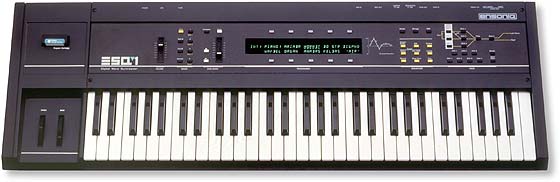

DIGITAL WAVE SYNTHESIZER ESQ1, it's my first stradivarius. Actually, I have integrated the ESQ-M (= the soundmodule version) as an additional tool into my midi-set. ESQ-M doubles the polyphonic limits of the ESQ1 (8 > 16 notes at the same time). The ESQ-M has the same specifications as the ESQ1 keyboard version, some hidden waves included but unfortunately without the hidden waves for the original ESQ1 on which my P-ART soundset (<click) is based.
Mirage: My first sampling machine from Ensoniq.


In the nineties, I loved the following features in my master/synthesizer/sampler/groove workstation EQUINOX 76 (GeneralMusic) :
- to change all inner aspects of the digital sound in realtime (1200 sounds on board),
- 8 sliders to perform and change different parameters of the sound, groove or recorded sequence,
- the jamming feature: I enjoy the 1000 editable riffs on board and I like to create (easely) new grooves.
- the open architecture IN and OUT: audio input of tape, CD or mike; 32 wavesamples (AIFF,WAV, Akai , Roland etc) can be loaded, edited, used and stored; to save large streams of music data on ZIP drive (the SCSI-port installed) and to load extremely long samples from ZIP drive or HD integrated in the performances; to save all parameters of music pieces in Standard Midi Files (limit: 250 000 MIDI-events); to drive other instruments (it is a full master station); the arpeggiator can master other MIDI-machines...
Roland RA-95 The Roland RA-95 was my preferred 3,5" disk drive recording system. Look at the following picture. With the MIDI-data directly recorded and stored on standard disks, I edit(ed) and finish(ed) the midi-compositions in SMF format and transmit the midi storaged files into computer. So, the Roland RA-95 is able to capture midi-events from the PAD5, CP-40 and digital Casio horn on disk. The Midi recording of the RA-95 don't crash under the tsunami of midi data from the Powerglove.
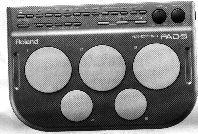
Allocate Midi note numbers to the pads of the Roland Pad 5, your two hands or two sticks control your soundmodule (drum, bass, voice, soundeffect) via the MIDI-Out. Changing from one internal riffs to other riffs, you can change the allocated pitch of the pads and hear other patterns.
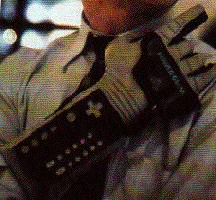
Moving the right hand (3D) my MIDI- POWERGLOVE sends MIDI-events (patches, notes, music patterns, sequences) to my music computer, to my keyboard, sound modules (GZ500, GMega, QY70, KR4500, EQUINOX), Mac computer. From a distance, I can even play strings, soundeffects or percussive notes in the range of 128 different MIDI-sounds. Go to my P-ART JOURNAL #28 Virtual Hands(<click) to read more about this alternative MIDI-controller.
scroll further down or
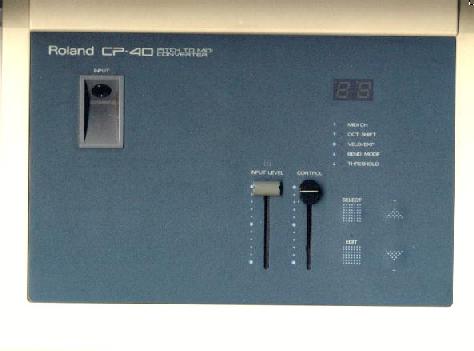
Enter your voice with a ordinary microphone of $ 10 into the Roland CP-40 : convert in realtime the analog input into MIDI-notes. Save the results on MIDI-disk. Look at THE P-ART MUSIC CABINET to hear the opportunity of this primeval pitch-to-MIDI converter in extremely bizar MIDI-performances. Due to his primitive converting rate large overtones or harmonics of your voice or harmonica are easely interpreted as unpredictable MIDI-notes. For experimental music in my case, this is musically extremely useful . When you like to correct the melodic part of a singer, I recommand to use AutoTune from ANTARES (for Mac or PC). A hardware rack of this software is even available now.
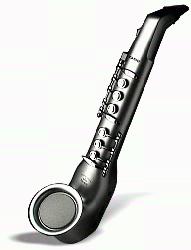
Casio Digital Horn DH100 is an MIDI breath controller to sing digitally or to play for instance virtual piano or drum from distance and in realtime. You can even play analog flute or organ on this Casio horn (you hear the sound immediately). The horn however isn't provided with MIDI-sounds. (DH100 has a midi-out to do so) .
Surprizing feature is to connect a cassettedeck through the phone input. Blow in the Casio and you play a synth sound coming from the cassettedeck as a primeval synthesizer circuit. How it 's possible? Read about this new approach of a cassettedeck in INSANE HOLLOW. Look at P-ART MUSIC CABINET (< click).
Connected to the KAOSSPAD SFX processor, I recovered the small monophonic synthesizer Casio VL1 as a vintage analogue synthesizer. KAOSS PAD Touch the display of the Korg Kaoss Pad to activate the x y - matrix, using one of the 60 algorithms. Evocate a new dimension of effect to all sounds (synth, CD source, mic etc) you like to cover.
The Kaoss pad is an essential part of my project and performance "THE NEW PREPARED PIANO 2001": I connect a contact-mike on the sound body of my grand and play the piano in a common way using some Kaoss effects in realtime to emulate gamelan and other digital prepared sounds. Look at the DVD-page "White as Piano".
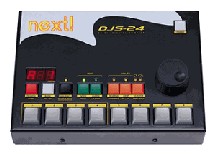
The NEXT 24 bit sampler DJS-24 is a real instant machine. Up to 8 samples (expandable to 16 or 32) coming from CD, mic (the sensitivity of the input is adjustable) or via PC can be stored easely in a sample bank (max. 4 banks). The playback of the samples can be programmed in sequences. DJS-24 features non-destructive editing. DJ oriented functions include seamless looping, pitch control, reverse play mode and scratching with cue point memory. Eight sample buttons can be pressed and played back in the same time. In Jingle mode the display countdown the remaining time of the played sample in tenths of a second.
Midicontroller keyboards >
The MidiMan OXYGEN8 (left) was my favorite midi keyboard controller. Since 2006 I use the XioSynth25 (Novation) as a plug- and -play midi controller keyboard. The Xiosynth is also a powerful synthesizer with Midi and USB interface. There is a handy XioSynthEditor on Mac (and PC) to store, send and save new soundbanks or templates.


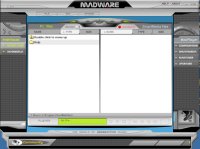
Making music is making decisions (notes, rhythms, scores) performed by real musicians. The MadPlayer is the all-in-one mini-musician machine that generates songs they are (secret) algorithmical random sequences and that works also like a sampleplayer (WAV, mp3) . The MadPlayer lets the music player by pushing on the buttons select a variation of generated parts (tracks) and lets assemble loops and virtual music instruments (MIDI) into songs on the go. I can compose my own music in a variety of styles, as well as use it to listen to your MP3s or FM radio. The metallic-green MadPlayer (powered with two AA batteries installed or via USB ) sits like a portable video game console in your hand palms. A 2.2-inch, backlit, monochrome LCD occupies the centre, surrounded by a ring of buttons. To the left is a directional pad, as well as the volume control, power, and save/edit buttons. On the right are buttons for control EQ and pitch without leaving the the d'ashboard'. To figure out what the buttons do, you need the manual. Sampling is possible in different formats and sampling rates (22, 44,1 kHz in 16-bits quality. For storage quality samples, I have expanded my Madplayer with the biggest SmartMedia card (originally 4 MB, now 128 MB). Headphones are included that sport an integrated microphone for recording my own rhymes adding great effects, just like a DJ. There is also a mike-in jack to connect to a powerful audiomixer or boxes. Finally, the madwave editor (Mac / PC) is very handy to swap, to save or to load sounds and sequences.
MIDJAY
MIDJAY (Ketron) (see also next chapter) is a very multifunctional tool for my purposes: it's a sampleplayer, a MIDI-soundmodule (player + recorder), a harddiskrecording system (30 Giga), and last but not least a DJ-module (crossfading jingles).
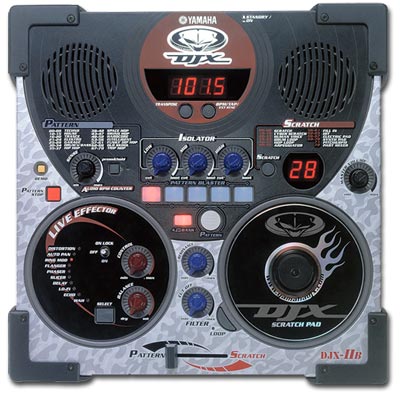
Just for fun!! Yamaha PRS E413 (right) is the only modern grooves keyboard to 'break open' the sounds and rhythm patterns (i.e. color and effects) while I play on the keyboard. After years, the DJXIIB-soundmodule (Yamaha) grooves fetter and MIDI as all other basic soundmachines. (see left on photo). Click and see the Yamaha PRS E413 more in detail.
The DJX-IIB (<click and see) is a box-shaped desktop module form of the keyboard version. This particular module is best suited for use by DJs. It packs in several new DJ useable features such as a scratch pad for 'scratchin' the patterns, and a fader to fly-in scratches. A Ribbon Controller on the keyboard version allows for scratching, as well as pitch bend, and more. Basic MIDI-clock sync and data dumping is implemented in both models, but the absence of MIDI note send/receive and RCA-style audio inputs & outputs reveal a design suited for home, hi-fi or DJ/PA use. If you are an inexperienced musician or keyboard player, but want to make your own dance music, or layer grooves over DJ sets, then check out the DJXII!
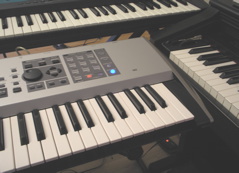
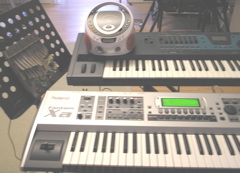
At top: Equinox, under: Fantom Xa, At the right: the KR-4500 arranger keyboard. Actually, the Fantom Xa is my favorite keyboard to produce great sounds and grooves, a very small synthesizer, in a wide range of different performance, patches and rhythms. On the picture you see the small, handy CD/RADIO player to take and collect new synth sounds on Fantom Xa which I connect for instance (cf.the double mbira (at the left side) via a contactmicrophone. For more detail, click and look at the picture of the FANTOM Xa.
© P-ART 1998-2002-2004-2007
Go to NEXT: (b) THE P-ART MUSIC SOFT EQUIPMENT go again to the information about the P-ART equipment
back to P-ART INSTRUMENTAL WORLD index
This page belongs to: http://users.skynet.be/P-ART